

 Premium version does not include an extra logo
How to Convert Videos to AVI: Step-by-Step Guide
Want to convert video to AVI? With our fast and reliable AVI converter, you can transform MP4, MOV, MKV, WMV, or FLV files into AVI format in just a few clicks.
The tool supports batch AVI conversion, making it simple to process multiple videos at once. Perfect for editors, archivists, and businesses who need stable, high-quality AVI videos for playback or editing on almost any device.
Step 1: Choose Videos to Convert
Open the converter tool and click Upload videos. You can select files in MP4, MOV, MKV, WMV, or other popular formats that you want to convert to AVI.


Step 2: Upload Files
Drag & drop your videos into the window or select them from your device. Multiple file upload is supported for batch AVI conversion.


Step 3: Select Output Format
Choose AVI as the target format. AVI is widely supported by video players, editing software, and legacy devices.
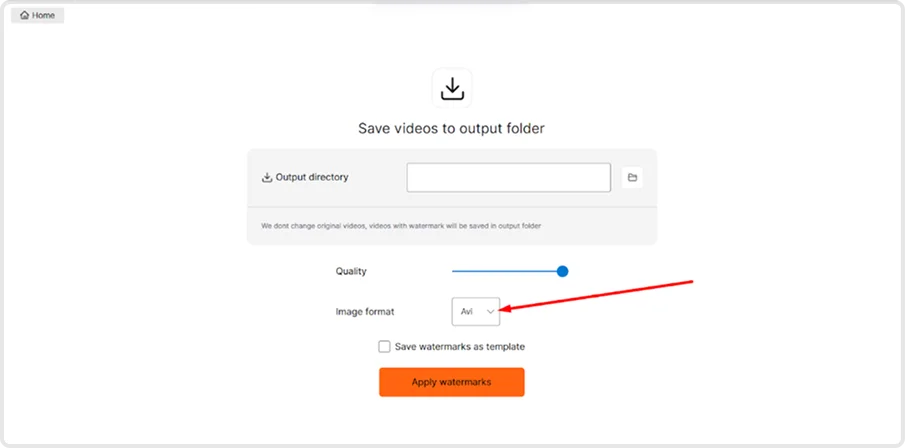
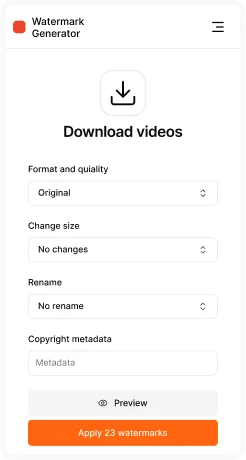
Step 4: Export & Save
Click Apply. The tool will process all uploaded files automatically. Once ready, download your AVI videos in high quality to the selected folder.
Key Features of AVI Converter
- Batch video conversion – convert multiple videos to AVI at once.
- Wide input format support – MP4, MOV, MKV, WMV, FLV, and more.
- Customizable quality – adjust resolution, bitrate, and frame rate.
- High compatibility – AVI works with most players, editors, and devices.
- Fast & reliable processing – optimized for large files and long videos.


